Microbit
Beginner
60 mins
Teacher/Student led
+85 XP

What you need:
Chromebook/Laptop/PC

Exploring the MakeCode Microbit Interface

In this lesson, you will explore the interface of MakeCode Microbit, understand its features, and how to navigate it. You'll write simple code and see the results in action on the simulator.

Teacher Class Feed

Load previous activity

    1 - Creating a new project

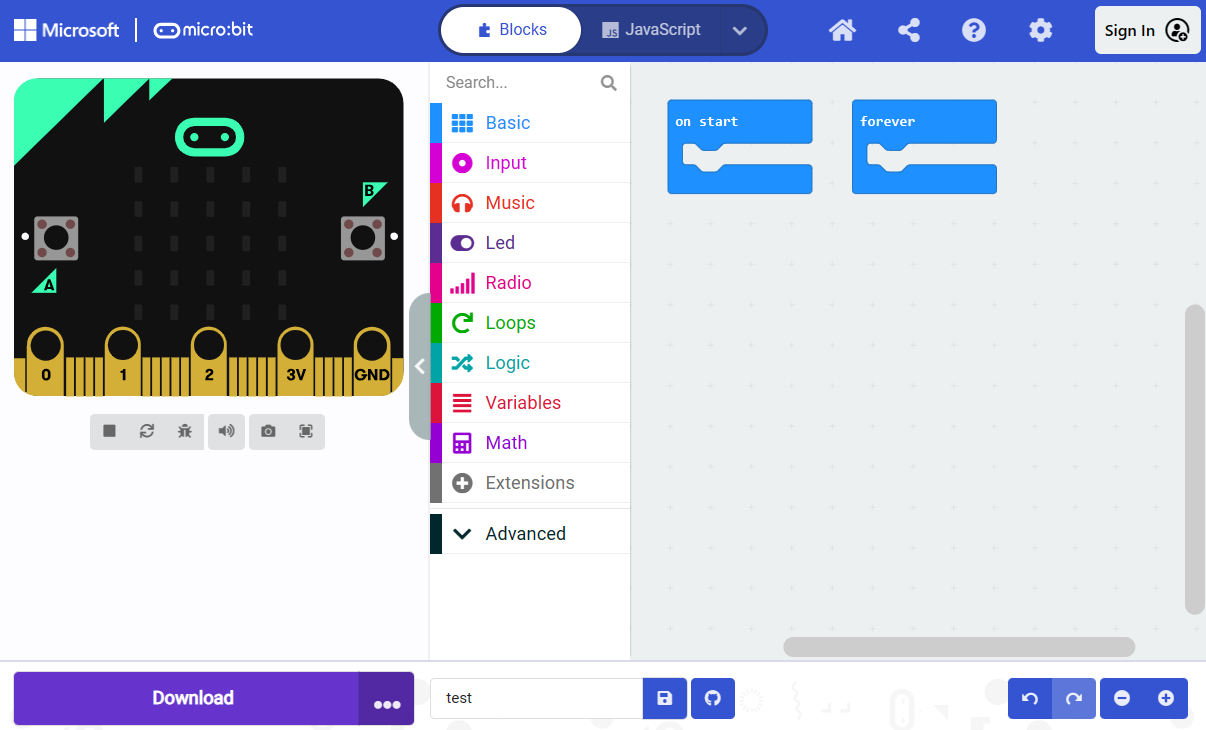
    Start by creating a new project. To do this, open the following URL in a new tab: https://makecode.microbit.org/. Click on 'New Project', give it a name, and then click 'Create'.

    2 - Exploring the interface

    Take a moment to explore the interface. On the left, you have the simulator where you can test your code. On the right, you have the code editor where you will write your code. Notice the different categories of code blocks available for you to use.


    3 - Writing your first code

    You're now going to write some simple code to make an LED on your Microbit light up. Add the following code in the code editor:

    basic.forever(function () {
    led.plot(2, 2)
    })

    This code will continuously light up the LED at the center of your Microbit's 5x5 grid.

    4 - Running your code

    After writing your code, click on the 'Play' button located below the simulator to run your code. You should see an LED light up in the center of the simulated Microbit on the left.

    5 - Exploring more features

    Explore other features of the MakeCode Microbit interface. Try out different blocks of code, observe their effect in the simulator, and get comfortable with the environment. Remember, the best way to learn is by doing!

    Unlock the Full Learning Experience

    Get ready to embark on an incredible learning journey! Get access to this lesson and hundreds more on our learning platform.

    Copyright Notice
    This lesson is copyright of Coding Ireland 2017 - 2025. Unauthorised use, copying or distribution is not allowed.
    🍪 Our website uses cookies to make your browsing experience better. By using our website you agree to our use of cookies. Learn more


