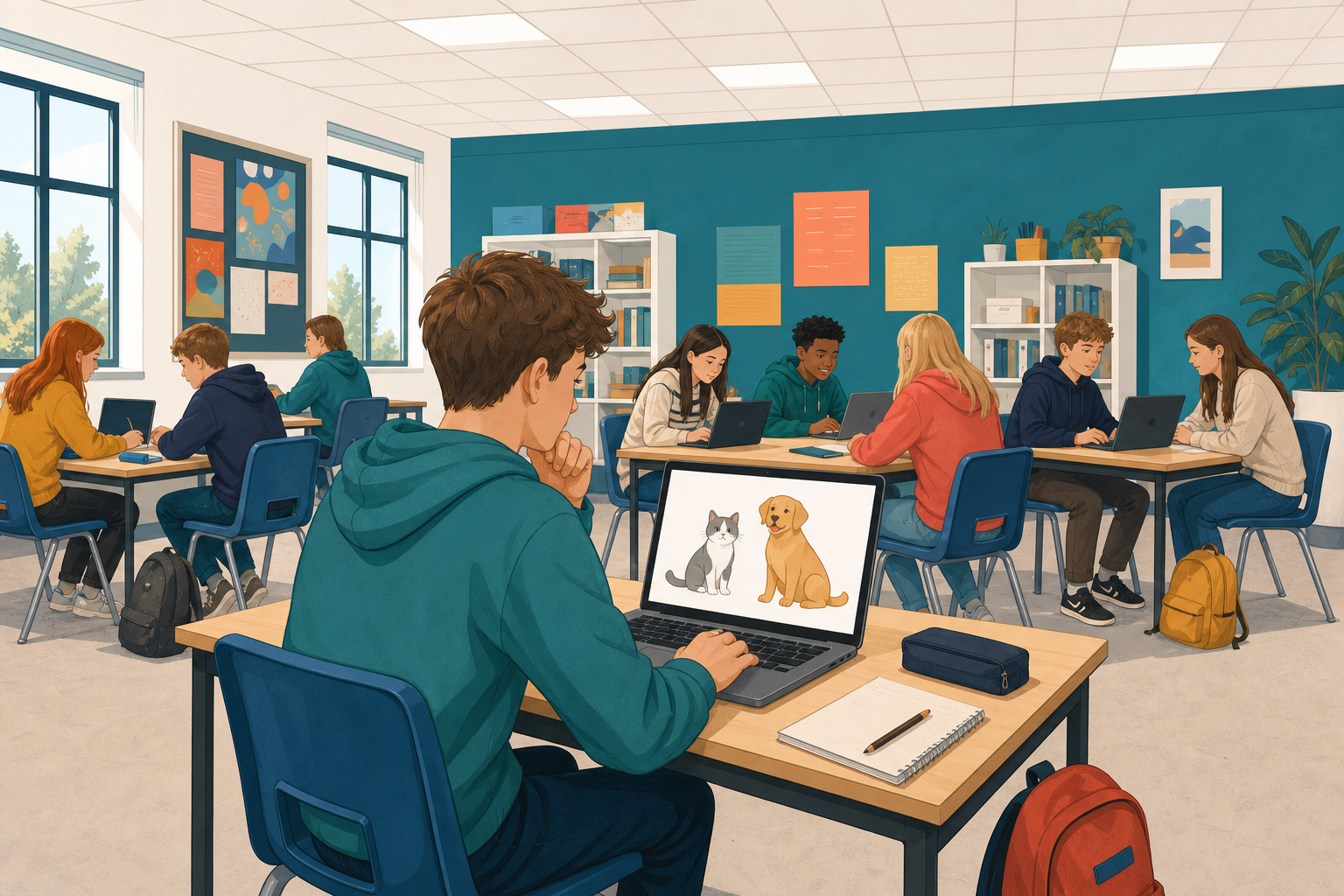
 Software decides things for you all day: what appears at the top of a feed, whether a photo has your face in it, what word you meant when you mistyped. The part of a program that decides is called an AI model.
Today you will
- meet the main kinds of AI model
- build one yourself in Scratch: a guesser made of rules that tells a cat from a dog
- find where it works and where it falls apart, which is the problem you solve next lesson
Here are five real things software does. Your teacher will take them one at a time. For each one, call out the kind of model you think is behind it.
Choose from these four kinds of model:
- Generative: it makes something new, such as text, a picture or code.
- Recommendation: it picks what to show you next, from what you liked or watched before.
- Classifier: it sorts something into a group, such as cat or dog, or spam or not spam.
- Agent: it is given a goal and works through the steps to reach it on its own.
- It recommends the next video you should watch.
- It turns a sentence you typed into a picture.
- It finishes the line of code you started.
- It spots a face in a photo.
- It books a table at a restaurant for you, on its own.
| Kind | What it does | Where you meet it when coding |
|---|---|---|
| Generative | Produces something new: text, an image, code | An assistant that drafts a function or explains code |
| Recommendation | Ranks options for one person | What a shop or a feed shows a given user |
| Classifier | Sorts an input into categories | Cat or dog, spam or not, rock or paper |
| Agent | Takes a goal, plans, uses tools, acts in a loop | Software that carries out a multi-step task |
The one you are about to build is a classifier. It takes something in and puts a label on it, and it is the simplest of the four to build by hand.
Go to scratch.mit.edu and click Create to start a new project. Call it Cat or Dog.
You will write all of today's code on the cat sprite that is already there, so you do not need to add anything.
Your guesser asks yes-or-no questions. The player presses y for yes or n for no.
Build this from Events (yellow), Looks (purple), Control (orange), Sensing (light blue) and Operators (green, where the or block lives). The wait until block holds the script until a key goes down.
Read it and predict: if you answer n, what will the cat do?
when green flag clicked
say [Think of a pet: a cat or a dog. Answer with y or n.] for (3) seconds
say [Rule 1. Does it bark?]
wait until <<key [y v] pressed?> or <key [n v] pressed?>>
if <key [y v] pressed?> then
say [I think it is a DOG.] for (4) seconds
stop [this script]
end
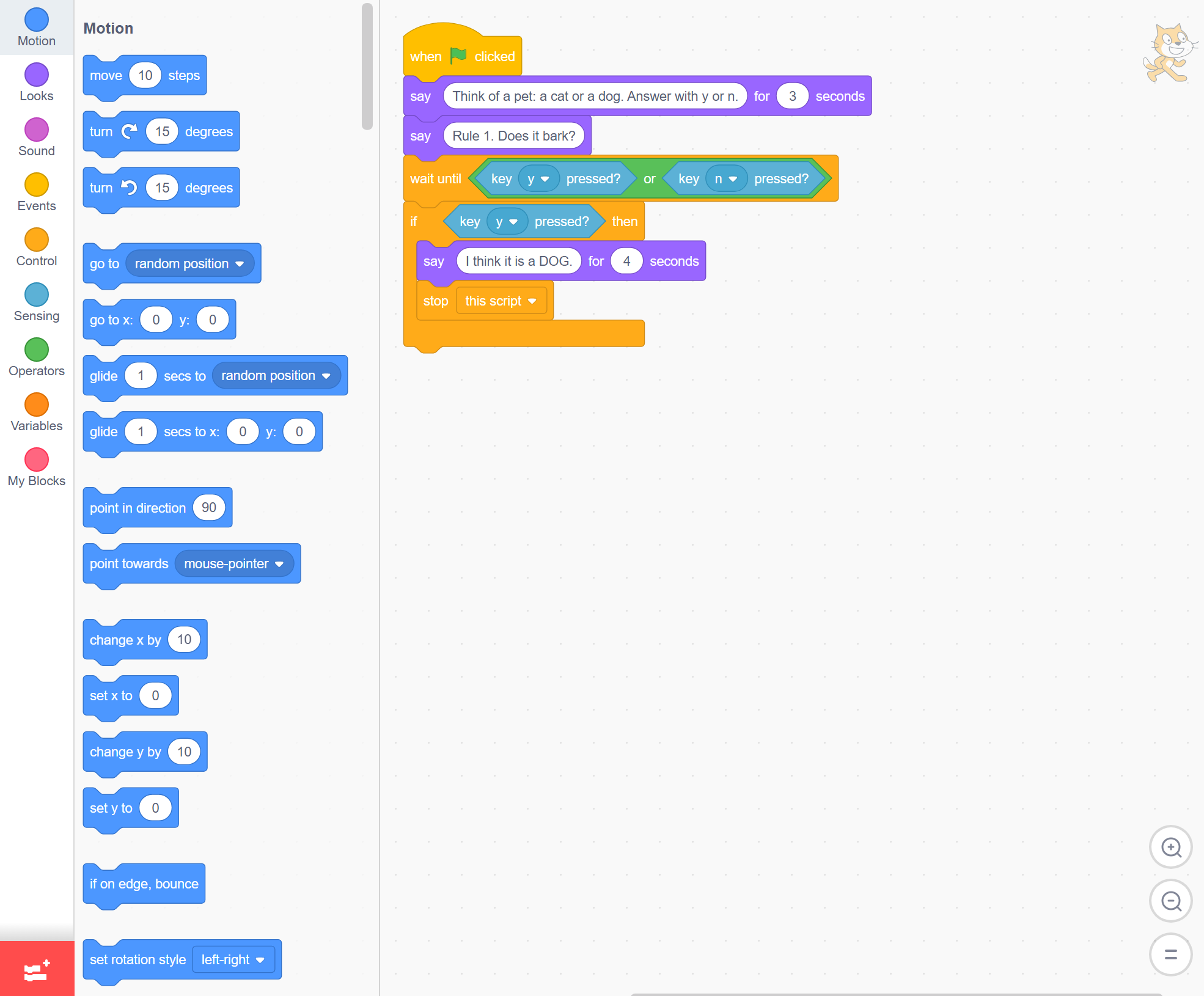
Click the green flag and answer y. The cat says DOG, which is right.
Now run it again and answer n. Nothing happens: the script just ends. One rule is not a classifier, it is an opinion. You need a rule for every answer.
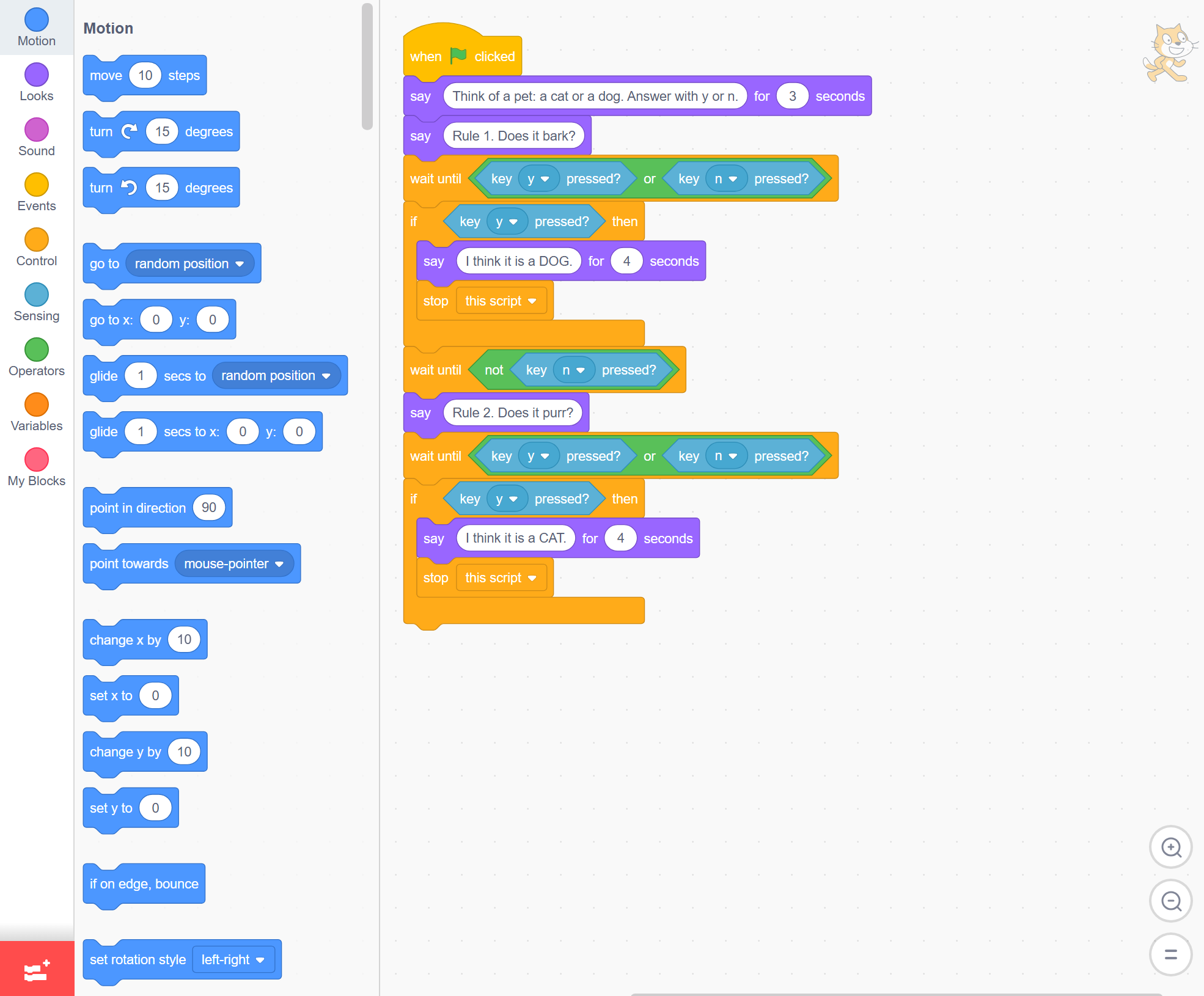
Add a second rule underneath the first. The extra wait until waits for the key to come back up: without it, one long press on n would answer every question at once.
Run it and answer n then y. The cat should say CAT.
when green flag clicked
say [Think of a pet: a cat or a dog. Answer with y or n.] for (3) seconds
say [Rule 1. Does it bark?]
wait until <<key [y v] pressed?> or <key [n v] pressed?>>
if <key [y v] pressed?> then
say [I think it is a DOG.] for (4) seconds
stop [this script]
end
wait until <not <key [n v] pressed?>>
say [Rule 2. Does it purr?]
wait until <<key [y v] pressed?> or <key [n v] pressed?>>
if <key [y v] pressed?> then
say [I think it is a CAT.] for (4) seconds
stop [this script]
end
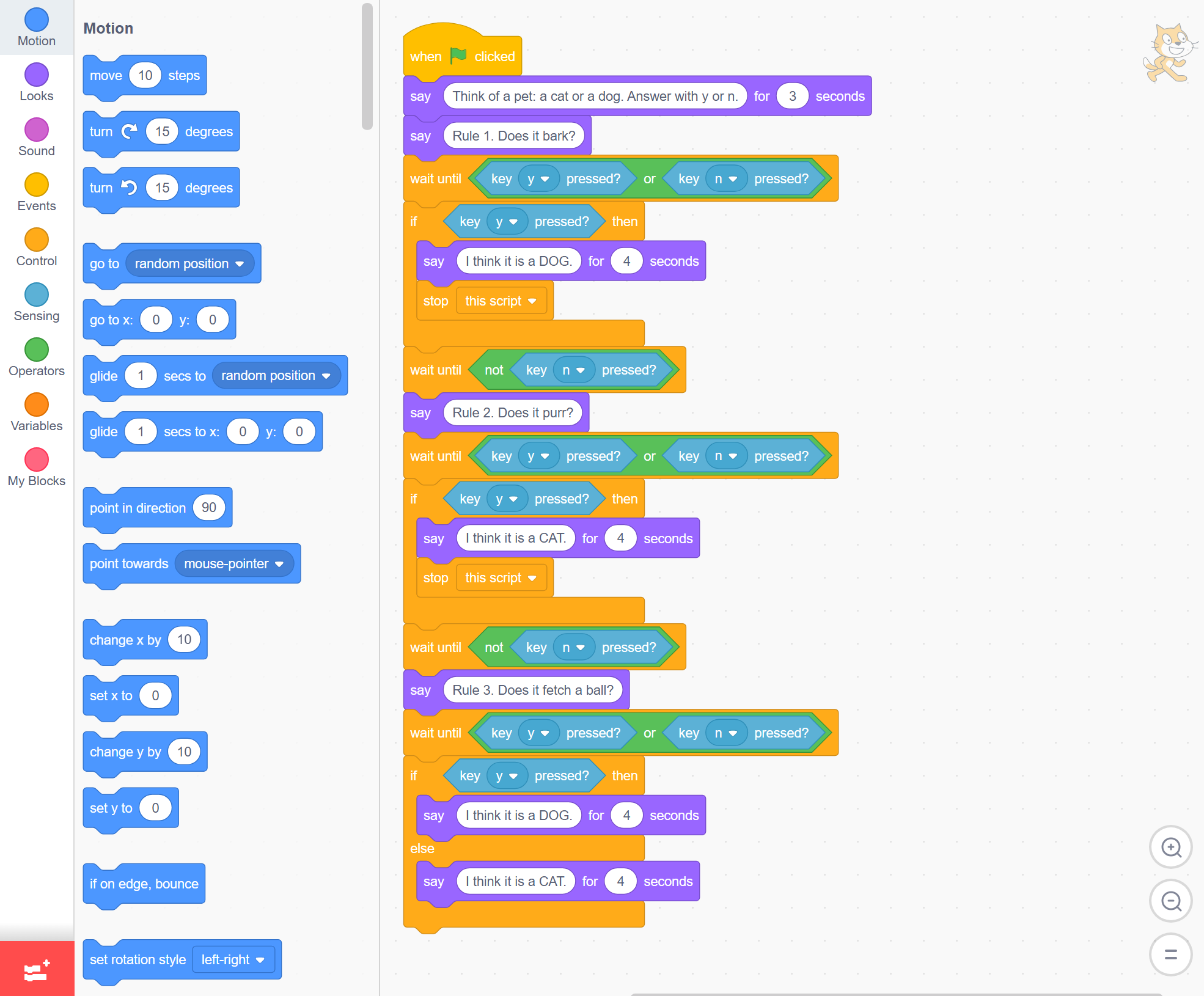
Add the last rule: if it fetches a ball, it is a dog, otherwise it is a cat. This one uses if / else, so every answer now leads somewhere.
Your guesser is finished. It is three rules long, and it is a real classifier.
when green flag clicked
say [Think of a pet: a cat or a dog. Answer with y or n.] for (3) seconds
say [Rule 1. Does it bark?]
wait until <<key [y v] pressed?> or <key [n v] pressed?>>
if <key [y v] pressed?> then
say [I think it is a DOG.] for (4) seconds
stop [this script]
end
wait until <not <key [n v] pressed?>>
say [Rule 2. Does it purr?]
wait until <<key [y v] pressed?> or <key [n v] pressed?>>
if <key [y v] pressed?> then
say [I think it is a CAT.] for (4) seconds
stop [this script]
end
wait until <not <key [n v] pressed?>>
say [Rule 3. Does it fetch a ball?]
wait until <<key [y v] pressed?> or <key [n v] pressed?>>
if <key [y v] pressed?> then
say [I think it is a DOG.] for (4) seconds
else
say [I think it is a CAT.] for (4) seconds
end
Test it the way you would test any program, with cases where you already know the answer.
- A noisy Labrador: y. Expect DOG.
- A cat on a windowsill: n, y. Expect CAT.
- A collie that rarely barks but loves a tennis ball: n, n, y. Expect DOG.
Three for three. A handful of if/else rules is a genuinely working classifier.
Try these:
- A basenji, a dog that genuinely cannot bark, and will not fetch: n, n, n. Your guesser says CAT. It is wrong.
- A cat that fetches, and some do: n, n, y. Your guesser says DOG. Wrong again.
You could add more rules, but every new animal needs another one, and they start to contradict each other. This is where hand-written rules run out.
Find a case your guesser gets wrong, then try to fix it with one more rule.
Before you finish, check: you can name an animal it fails on, you added a rule to catch it, and you can say what your new rule broke or nearly broke.
You built a classifier out of rules you wrote yourself. On clear cases it was right every time. On the awkward ones it was confidently wrong, and adding rules made it worse, not better.
A model that learns from examples does not need you to think of every case in advance. That is what you build next.
Think about
- Your guesser was confidently wrong about the basenji. Where else might software be confidently wrong about you?
- You could read every rule in your guesser. Is that worth something, even though it was less accurate?
Today you:
- Named the four kinds of AI model: generative, recommendation, classifier and agent
- Built a classifier by hand in Scratch, out of three yes-or-no rules
- Found the cases it gets wrong, and why adding rules does not fix them
Save your project where your class keeps its work (your teacher will show you where), so you can open it again.
That was a sample lesson from Exploring Artificial Intelligence
Every lesson in the course is ready to teach like this one. See what else comes with it, and how to order it.
This lesson is copyright of Coding Ireland 2017 - 2026. Unauthorised use, copying or distribution is not allowed.
Scratch is developed by the Lifelong Kindergarten Group at the MIT Media Lab. It is available for free at https://scratch.mit.edu