 This is the first lesson of Exploring Digital Media. In this course you will:
- look at how the media you see is chosen and made
- make your own images, audio and video
- learn to spot media that has been changed to mislead
Before you choose what to open, an app has already chosen what to show you. How does it make that choice, and what is it aiming for?
 An algorithm is a set of rules an app uses to decide the order of posts, search results and recommendations. It is not a person reading your feed, but software that orders posts using signals.
- Recommendations are the videos, songs or things to buy that the app suggests to you.
- Signals are clues, such as how new a post is, who shared it, how many people liked it, and how long people spent on similar posts.
If the same five posts are waiting, what changes when the feed is told to keep you scrolling, keep you informed, or show the newest first?
- With your class or a partner, pick the two posts you would put at the top of the feed, and move them up with the arrows in the activity below. Say why, using the clues on each card, like who posted it, how people reacted, how old it is, and whether it looks useful or emotional.
- Then pick a goal and watch which of your top picks stay up and which sink. Be ready to name one post that moved, and one useful post that dropped down because of that goal.
Be the algorithm: your feed

Now be a detective on a feed you really use, such as the app you open first in the morning. It could be social media, video, music or shopping. Work on your own, then be ready to share one note with a partner. Write four short notes:
- The name of the feed and what you think it mainly chases, such as keeping you scrolling, keeping you informed, showing the newest first, or something else.
- Two signals it seems to use, such as likes, watch-time, friends, things you bought, or how new a post is.
- One kind of post that probably rises in that feed, and one kind that probably sinks, even if the one that sinks might be more useful.
- One sentence that finishes the line below.
When this feed chases ___, it gives up ___.
- A video app. It mainly chases keeping me watching.
- It seems to use which videos I watch to the end, and what my friends like.
- Short funny clips rise. Longer how-to videos sink, even the useful ones.
- When this feed chases watch-time, it gives up the slower videos that teach me something.
You should have four short notes you could read aloud in under thirty seconds. If school rules block the app, work from what you remember about it.
If time is short, finish the four notes for homework and bring your sentence to share next time.
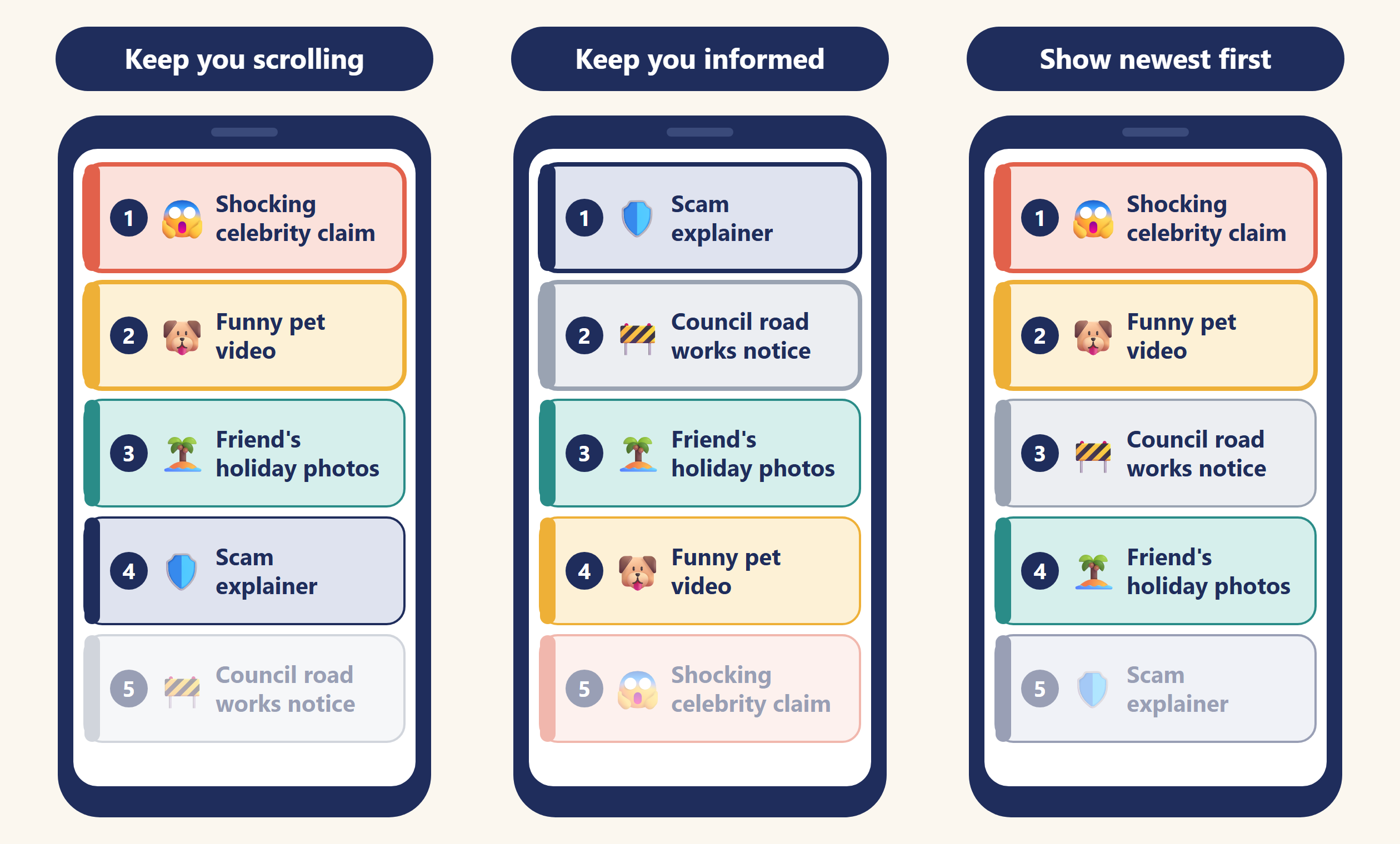
Here is what each goal did to the same five posts.
| Goal | What rises | What sinks |
|---|---|---|
| Keep you scrolling | Posts that stir up strong feelings or get watched and shared a lot, like the shocking claim and the funny pet video | Useful but quiet posts, like the scam explainer and the council notice |
| Keep you informed | Useful posts from trusted sources, like the scam explainer and the council notice | The shocking claim and the pet video, even though people react to them the most |
| Show newest first | Whatever was posted last, like the shocking claim, before anyone checks it is true | Older posts, like the scam explainer, even when they are the most useful |
Feeds and search results are ordered for a reason. When you can name that reason, you can ask why something is on your screen and what might be missing.
Unlock the full learning experience
You're previewing this lesson. Get full access to this lesson and hundreds more — each one ready to teach, with interactive activities, printable resources and pupil progress tracking built in.
This lesson is copyright of Coding Ireland 2017 - 2026. Unauthorised use, copying or distribution is not allowed.