Secondary Transition Year

Computer Skills

Master essential computer skills through a real world project.

  • Mapped to the NCCA curriculum

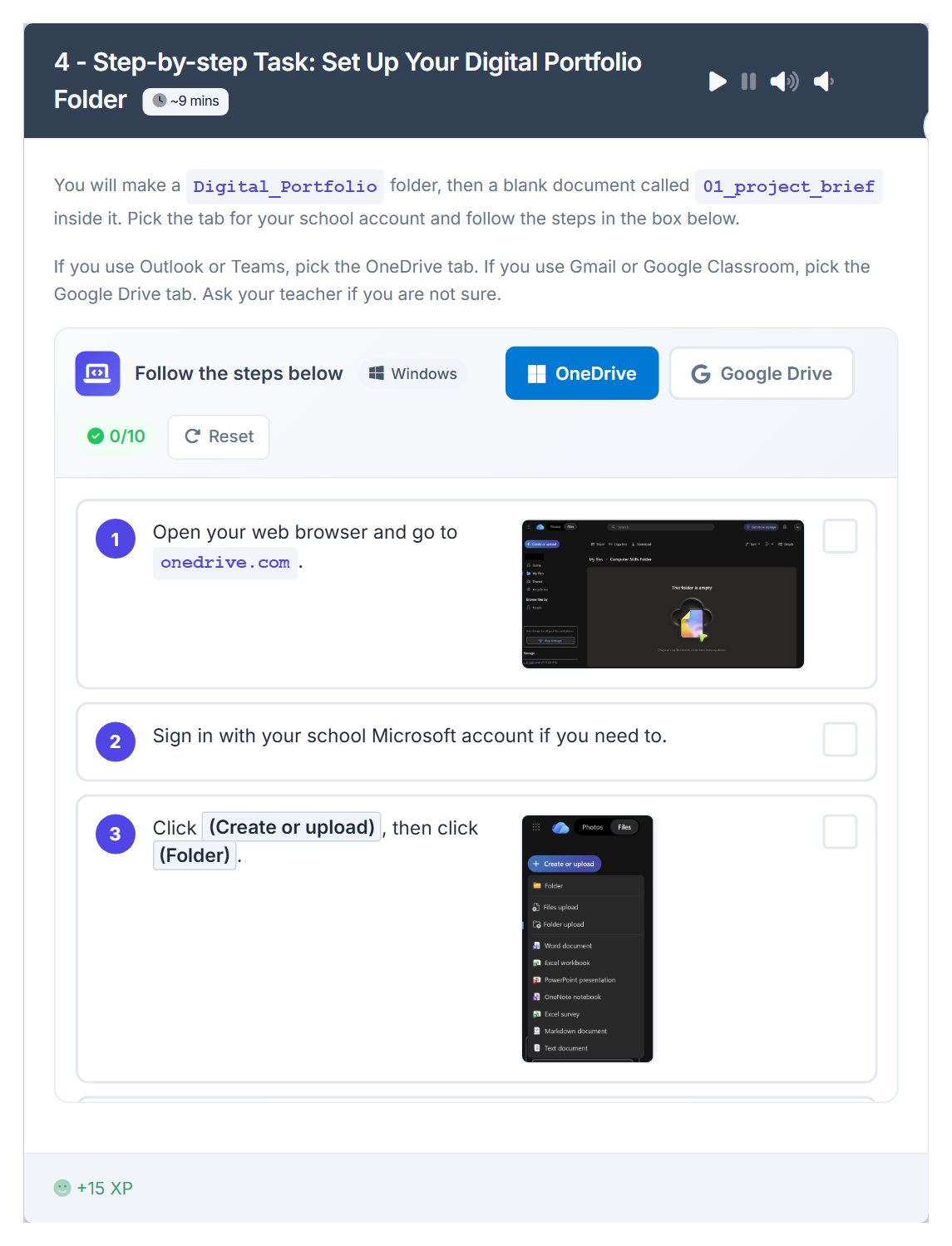
The whole first lesson, as your class sees it. No sign-in needed.

On the board, and on their devices
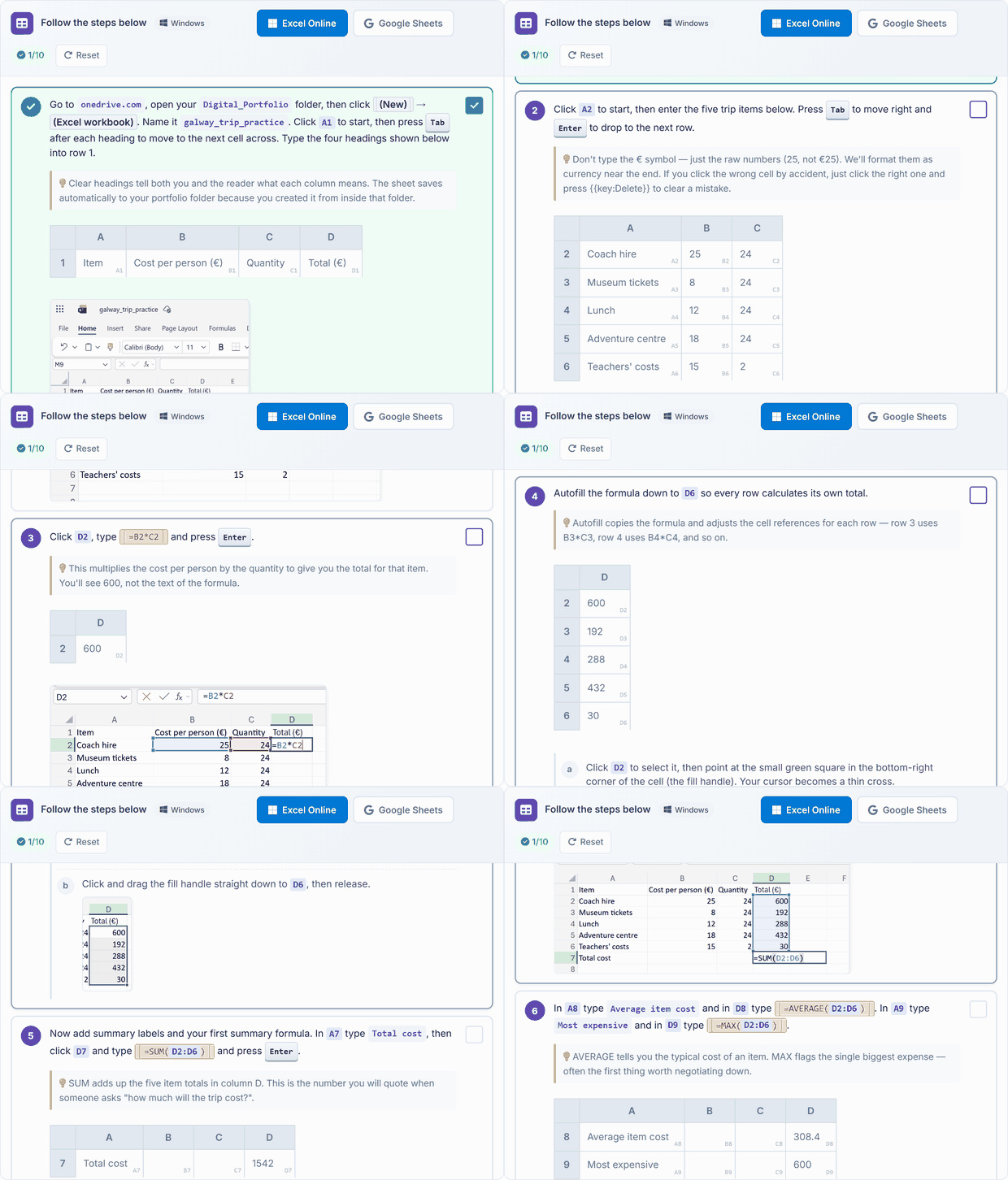
Building a spreadsheet, step by step
Setting up the digital portfolio

The same lesson opens on each student's own device, to follow in class and finish at home.

What your school gets

Everything a teacher needs to teach Computer Skills this year.

In class

  • 10 lessons, ready to teach Each one planned step by step, taught from the board with the same lesson open on each student's device. 3 interactive activities across the course.
  • Quizzes and assessments A short quiz with every lesson.
  • Progress and resultsWhat each student has completed, and how they did.
  • CertificatesFor portfolios, open days and reports home.
  • Try the first lesson: Kickoff: Pick Something Real and Set Up Your Digital Portfolio

On paper

  • Teacher Resource BookThe whole course laid out for the teacher, lesson by lesson, ready to print.
    The sample lesson's pages

The whole books come with the course, in each class's Resources.

The curriculum it covers

Every lesson is mapped to the specification. This course teaches 6 of the 42 outcomes for this class.

Personal Growth 1 of 11 outcomes
Being a Learner 2 of 12 outcomes
Civic and Community Engagement 3 of 11 outcomes
Career Exploration 0 of 8 outcomes
See every outcome
Curriculum Area
Outcomes
Personal Growth
P.1 P.2 P.3 P.4 P.5 P.6 P.7 P.8 P.9 P.10 P.11
Being a Learner
B.1 B.2 B.3 B.4 B.5 B.6 B.7 B.8 B.9 B.10 B.11 B.12
Civic and Community Engagement
C.1 C.2 C.3 C.4 C.5 C.6 C.7 C.8 C.9 C.10 C.11
Career Exploration
CE.1 CE.2 CE.3 CE.4 CE.5 CE.6 CE.7 CE.8

Tap any outcome to read it. The coloured ones are taught in this course. The curriculum does not include official reference codes for individual learning outcomes, so we have assigned a code scheme to make it easier to identify and track coverage.

The course, module by module

10 lessons in 5 modules. The lesson marked Sample opens in full.

1 Digital Foundations 2 lessons · about 2 hours

This module introduces foundational digital skills through practical application. Students select a meaningful real-world project, establish a digital portfolio in cloud storage, and draft a project brief outlining its purpose and audience. Subsequent lessons focus on discerning reliable sources, verifying information, and safely incorporating AI tools to gather and document five key facts, fostering critical research habits for project development.

  1. Files, Folders & Your Digital Portfolio
  2. 1 Kickoff: Pick Something Real and Set Up Your Digital Portfolio Sample lesson Quiz
  3. Research, Safety & AI Literacy
  4. 2 Research Without Getting Tricked: Sources, Scams & AI in 2026 Quiz
2 Creating Documents 2 lessons · about 2 hours

This module teaches students to craft professional documents, beginning with writing persuasive one-page proposals using heading styles, formatting, and spell-check. It progresses to layout and design techniques, incorporating headers, images, tables, and lists to enhance visual appeal and credibility. Through guided examples, independent practice, and peer review, learners develop documents suitable for real-world applications.

  1. Word Processing Fundamentals
  2. 3 Write It Down: Documents That Get You Taken Seriously Quiz
  3. Document Design
  4. 4 Make It Look Like You Meant It: Layout & Design Quiz
3 Working with Spreadsheets 2 lessons · about 2 hours

This module equips learners with practical spreadsheet skills to transform project data into actionable insights. Participants build budgets, inventories, and summaries using formulas like SUM and AVERAGE, then apply sorting, filtering, charts, and conditional formatting with IF statements to reveal patterns and inform decisions.

  1. Spreadsheets & Formulas
  2. 5 The Numbers: Spreadsheets for Real Decisions Quiz
  3. Charts & Data-driven Decisions
  4. 6 Seeing the Story: Charts, Filters & IF Quiz
4 Working with AI 1 lesson · about 1 hour

This module explores effective collaboration with AI assistants, treating them as drafters, critics, and explainers for personal projects. Participants learn key prompting techniques—specificity, role assignment, examples, and iteration—to achieve reliable outcomes. Through guided practice on real work, including common pitfalls and verification strategies, learners build practical skills for authentic AI integration.

  1. 7 Your AI Copilot: Prompting AI to Do Better Work Quiz
5 Presenting & Pitching 3 lessons · about 3 hours

This module equips learners with essential skills for effective presentation and pitching. Participants construct concise five-slide pitch decks, incorporating hooks, rationales, data, and calls to action, while integrating portfolio content and refining delivery through speaker notes. Collaborative feedback via peer reviews and professional emails is practised, culminating in live two-minute pitches and portfolio walkthroughs to consolidate ten weeks of digital proficiency.

  1. Pitch Decks
  2. 8 Pitch Deck: Slides That Don't Put People to Sleep Quiz
  3. Collaboration & Communication
  4. 9 Working with Others: Collaboration, Feedback & Email Quiz
  5. Pitch Day
  6. 10 Pitch Day & Portfolio Walkthrough Quiz

What students learn

This course equips students with essential computer skills through hands-on application to a personal project of their choice. Participants establish a digital portfolio, conduct verified research, craft professional documents and spreadsheets, leverage AI tools, and deliver persuasive pitches. Over ten weeks, learners develop practical proficiency in cloud storage, data analysis, collaboration, and presentation, fostering real-world digital competence.

By the end of the course, students can

  1. Select a meaningful real-world project and establish a structured digital portfolio in cloud storage, including a detailed one-page project brief outlining objectives, significance, and target audience.
  2. Conduct reliable online research by identifying trustworthy sources, verifying facts through cross-referencing, and safely incorporating AI outputs, compiling at least five validated facts into a portfolio research page.
  3. Produce professional documents and spreadsheets for project proposals, applying formatting techniques, formulas (e.g., SUM, AVERAGE, IF), and data visualisation tools to create budgets, charts, and decision-support analyses that update dynamically.
  4. Employ AI assistants effectively as drafters, critics, and explainers by crafting specific, iterative prompts with roles and examples, then integrating and refining outputs to enhance personal project work.
  5. Develop and deliver a concise two-minute pitch deck with speaker notes, collaborate via shared feedback on slides, and present a comprehensive digital portfolio walkthrough demonstrating ten weeks of integrated computer skills application.

What you'll need

Used in some of the lessons. Students can share in groups of two or three.

Chromebook/Laptop/PC iPad/Tablet

Build a full TY year around Computer Skills

This module is one of 10 Transition Year modules you can combine into a complete Year-Long TY Digital Skills Programme, shaped around your timetable and the students in front of you.

Run the same pathway for every student, or set different pathways for different groups. Students also get access to the modules they're not doing in class, which is ideal for the keen ones who finish early or want to explore further on their own time.

Prefer a deeper tech focus? Swap in Advanced Coding or Robotics and Automation. Each module is 10 to 17 lessons of 40-60 minutes, leaving room for school events, mid-terms and everything else TY throws at you.

Why TY coordinators choose it
One decision, a year's content
No more stitching resources together every term.
Flexible per class, per student
Run different pathways side by side.
Certificates after each module
Great for TY portfolios, open days and reports home.
Sets students up for Senior Cycle
Broad exposure so they choose subjects with confidence.
Sample Year Plan
ICT + Coding focus
  • Computer Skills
    Gets everyone on a level footing
  • Introduction to Coding
    Real, working projects from week one
  • Exploring Digital Media
    Video, design and storytelling
  • Exploring Artificial Intelligence
    The topic your students keep asking about
  • Enterprise and Business Basics
    A pitch-and-launch project to close out the year

Ready to bring Computer Skills to your school?

Get in touch to discuss pricing and ordering for your school.

Back to Transition Year courses
Ready to get started?
Pricing & Ordering Contact Us
🍪 Our website uses cookies to make your browsing experience better. By using our website you agree to our use of cookies. Learn more